How do I get my PeopleCert certificate?
Congrats on your exam pass!
Now its time to get your certificate on the wall.
Sign in to PeopleCert.org.
Click on your initials in the top right then click Certifications.


Scroll down if necessary to find your certification.
Click on View Certificate.

The certificate will be downloaded to your default downloads folder. It will probably be called e-cert.pdf.
The pdfs are not locked, so you can print them on a nice colour printer and then frame them and put them on your wall.
Synapse Pools
Dedicated SQL Pool
Designed for Kimball style star/snowflake schema data warehouses.
Billed for storage and compute. Can be paused.
Contains tables (internal, external, temp), views, procedures - it is a database.
Internal tables are columnstore.
Does not support OPENROWSET, external tables must be explicity created.
Query language is TSQL.
Serverless SQL Pool
Designed for data processing, not data storage.
Billed per-use for compute only. Has cost budgets and limits.
Does not contain internal tables, just external and temporary.
Query language is TSQL.
Links
Why did Don Jones say that using Write Host kills a puppy?
Don Jones, a highly experienced author, MVP, and PowerShell expert, famously once said that every time you use Write-Host, you kill a puppy. See Jeffrey Snover's blog for more information.
So, why is it considered so bad? Because it messes with the output streams.
Consider a PowerShell script file with the following two lines.
"This is a test message."

  "This is a test message written to Write-Host." | Write-Host
When you run this and redirect the output to a text file, the second message is written to the screen and not written to the text file.

This means that if you run the script from inside some other system, for example a SQL Server Agent job, then you won't be able to capture the output, which is bad.
There are a lot of articles on the web discussing the issue in more detail. Here are a couple that I like.
Write-Host – The gremlin of PowerShell, by Jeff Wouters
Puppycide done right - output versus messages
Microsoft products in the Defender family
Microsoft describe Microsoft Defender XDR and Microsoft Defender for Cloud as their XDR products, with Microsoft Sentinel as their SIEM and SOAR product.
They are, however, very lax with these names. Sometimes they will use "Microsoft Defender for Endpoint", sometimes "Microsoft 365 Defender for Endpoint". There are also plenty of learn.microsoft.com pages using one or more of the old names.
Exchange Server Recipients
There are a number of types of Exchange Server recipients, differentiated by the RecipientType and RecipientTypeDetails properties. The following are the common mailbox-enabled recipients.
SQL Server Options for Auditing
Server Audit
Captures: Who did (or failed to do) what command and when
Does not capture: What rows/values they touched.
Applies To: SQL Server 2008 Enterprise, SQL Server 2012+ Standard.
Azure SQL Database does have auditing, but it is a different architecture.
Change Data Capture
Captures: What values were inserted, updated or deleted
Does not capture: Who or when, SELECT
Applies To: 2008+ Enterprise
DML Trigger
Captures: Who did an INSERT, UPDATE or DELETE on a table or view, and when and what
Does not capture: SELECT
Notes: Do not fire for all statements (e.g. TRUNCATE TABLE, BULK INSERT)
Applies To: SQL Server, Azure SQL Database.
DDL Trigger - Database scope
Captures: Who CREATEd, ALTERed or DROPped objects in a database
Notes: Does not fire for all statements (e.g. DISABLE TRIGGER).
Applies To: SQL Server, Azure SQL Database.
DDL Trigger - server scope
Captures: Who CREATEd, ALTERed or DROPped objects at the server level.
Notes: Does not fire for all statements (e.g. RESTORE DATABASE).
Applies To: SQL Server.
Logon Trigger - server scope
Captures: Who logged on and when.
Applies To: SQL Server, Azure Synapse Analytics (TOCHECK).
Profiler, Server Trace, Extended Events
Captures: Commands sent to the server.
Does not capture: The results of the commands.
Applies To: SQL Server.
Big Data Architecture with Azure
Diagrams

Book Recommendations
Mastering Azure Analytics, by Zoiner Tejada.
Beginning Apache Spark Using Azure Databricks: Unleashing Large Cluster Analytics in the Cloud, by Robert Ilijason. I haven't read this but have had it recommended to me.
Understanding Azure Data Factory: Operationalizing Big Data and Advanced Analytics Solutions, by Sudhir Rawat and Abhishek Narain. I haven't read this but have had it recommended to me.
Architecture
There are a number of different high-level architecture diagrams available for big data processing, with various names for the phases.
The most common version has nine phases: Data Sources, Data Storage, Real-Time Message Ingestion, Batch Processing, Stream Processing, Machine Learning, Analytics & Reporting, Orchestration.
https://docs.microsoft.com/en-us/azure/architecture/data-guide/big-data/


Some Microsoft docs simplify it into four phases: Load & Ingest, Store, Process, Serve. Annoyingly, they often name them differently. For example, course DP-201 and its exam use the terms Ingestion, Data Storage, Analysis, and Virtualization. Except where they use Ingest, Process, Store, and Analyse/Report. Courses DP-200 and DP-203 (and their associated exams) use Ingest, Store, Prep & Train, and Model & Serve. Sheesh.
https://docs.microsoft.com/en-us/azure/architecture/data-guide/big-data/
Choice of Batch Processing services
Azure Databricks, Azure Synapse Analytics and Azure HDInsight have a lot of overlap between their use cases (the Batch Processing section of the big picture). I guess Fabric is also going to be a choice, when Microsoft release it in a working state. :-)
https://adatis.co.uk/databricks-vs-synapse-spark-pools-what-when-and-where/
https://www.clearpeaks.com/cloud-analytics-on-azure-databricks-vs-hdinsight-vs-data-lake-analytics/
https://stackoverflow.com/questions/50679909/azure-data-lake-vs-azure-hdinsight
https://visualbi.com/blogs/microsoft/azure/etl-azure-databricks-vs-data-lake-analytics/
We could also mention Azure Batch, though it is more an HPC service than a BI service.
https://azure.microsoft.com/en-us/services/batch/
Note that Azure Data Lake Analytics hasn't seen any updates for a couple of years (and its query language, U-SQL, doesn't support Data Lake Storage Gen2). It seems to have been abandoned.

.png)


Tools for Microsoft Azure
Azure PowerShell Modules
Run an elevated PowerShell or PowerShell ISE console.Install-Module AzureAD
Install-Module MSOnline
Install-Module Az # Replaces AzureRM
Azure CLI
Click the Install on Windows link. Download and run the installer.
Azure Storage Explorer
Click the Download Storage Explorer Free link. Download and run the installer.
AzCopy
Click the Download the latest version of AzCopy on Windows link. Download and run the installer.
Visual Studio
Click the Community edition Free Download link. Download and run the installer.
Add the following workloads:
- Web & Cloud section
ASP.NET and web development
Azure development
Data storage and processing
SQL Server Management Studio
Download and run the installer.


PowerShell code signing (course 10961B)
On LON-DC1
Install the full UI.
Install-WindowsFeature User-Interfaces-Infra –IncludeAllSubFeature
Install-WindowsFeature User-Interfaces-Infra –IncludeAllSubFeature
Restart.
Install AD Certificate Services.
Install-WindowsFeature AD-Certificate, ADCS-Cert-Authority –IncludeManagementTools
Install-WindowsFeature AD-Certificate, ADCS-Cert-Authority –IncludeManagementTools
Server Manager, Post-deployment
Configuration.
Create an Enterprise Root CA called “ADatum CA”.
Create an Enterprise Root CA called “ADatum CA”.
Run Certification Authority management
tool.
Right click Certificate Templates, choose
Manage.
Right-click Code Signing, choose Duplicate
Template.
General tab, Template display name “Code Signing II”.
Request Handling tab, select Allow private key to be exported.
Click OK.
General tab, Template display name “Code Signing II”.
Request Handling tab, select Allow private key to be exported.
Click OK.
Close Manage Templates.
Switch to Certification Authority
management tool.
Right click Certificate Templates, choose
New Certificate template to Issue.
Code Signing II.
Code Signing II.
On LON-CL1
Start, Run, certmgr.msc.
Right-click Personal, choose All Tasks,
Request New Certificate.
Select Certificate Enrollment Policy page, click Next.
Request Certificates page, select Code Signing II, click Enroll.
Select Certificate Enrollment Policy page, click Next.
Request Certificates page, select Code Signing II, click Enroll.
Open Personal \ Certificates.
Right-click the certificate with a template
of Code Signing II, choose Copy.
Right-click Trusted Publishers, choose Paste.
Note: In practice you should use Group Policy to distribute the Trusted Publisher certificate, probably to machines' certificate stores.
Right-click Trusted Publishers, choose Paste.
Note: In practice you should use Group Policy to distribute the Trusted Publisher certificate, probably to machines' certificate stores.
Run a PowerShell prompt.
cd CERT:\CurrentUser\my
$CSCert = (dir -CodeSigningCert)[0]
Set-AuthenticodeSignature -Certificate $CSCert -FilePath E:\Democode\
cd CERT:\CurrentUser\my
$CSCert = (dir -CodeSigningCert)[0]
Set-AuthenticodeSignature -Certificate $CSCert -FilePath E:\Democode\
If the signing is successful then you will see something similiar to the following.
SignerCertificate Status Path
----------------- ------ ----
84623FD8D796C6E722DE330B4DDFD6FEB01AF412 Valid Demo-Signing2.ps1


Remotely administering Hyper-V with WinRM
Hyper-V in Windows 10 and Server 2016 uses WinRM for remote management.
In order to remotely manage a machine that is not in the same domain as the client, the server's name or IP address must be added to TrustedHosts on the client and CredSSP authentication must be configured on both machines.
On the server:


In order to remotely manage a machine that is not in the same domain as the client, the server's name or IP address must be added to TrustedHosts on the client and CredSSP authentication must be configured on both machines.
On the server:
Enable-PSRemoting # On by default in Windows Server.
Enable-WSManCredSSP -Role server
On the client:
$HVHost = "172.29.203.25"
$TH = Get-Item WSMan:\localhost\Client\TrustedHosts | select -ExpandProperty value
if ( $TH.Length -eq 0 )
{ $TH = $HVHost }
else
{ $TH += ",$HVHost" } # A comma-separated list.
{ $TH = $HVHost }
else
{ $TH += ",$HVHost" } # A comma-separated list.
Set-Item WSMan:\localhost\Client\TrustedHosts -Value $TH
Enable-WSManCredSSP -Role client -DelegateComputer $HVHost
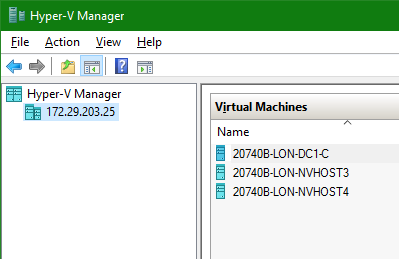
From Hyper-V Manager, connect to server. Enter the server's name or IP address and click the Set User button to enter an administrative username and password.

Subscribe to:
Posts (Atom)